phpwarden documentation
Find and contain PHP vulnerabilities across your engine, Composer dependencies and WordPress — ranked by real-world exploitation (CISA KEV + EPSS), not just CVSS.
Version 2.0.0 · zero runtime dependencies · works offline.
What is phpwarden?
phpwarden is a command-line tool (with an optional hosted dashboard) that tells you which parts of your PHP stack have known, currently-exploited vulnerabilities — and which to fix first. It looks at the whole stack, not one slice:
| Surface | What it checks | Command |
|---|---|---|
| Engine | the PHP interpreter version itself (e.g. 8.3.0 vs the fixed 8.3.36) | phpwarden scan |
| Dependencies | your Composer packages, from composer.lock | phpwarden deps |
| WordPress | the plugins in a WordPress install (core and theme advisories are not in the feed yet) | phpwarden wordpress |
| Live logs | access/error logs for signs of an attack in progress | phpwarden detect |
| Runtime | a daemon that contains a PHP-FPM worker attack as it happens | phpwarden-guard |
Two ideas make it different from a plain CVE scanner:
- Exploitation-first. Findings are ranked by whether attackers are actually using them right now (CISA KEV + EPSS), not just by CVSS severity. The thing being exploited today floats to the top — see Key terms.
- Offline & self-contained. The vulnerability feed is bundled in the download. It runs with no account and no network — results never leave the machine unless you choose to send them to a dashboard.
How the pieces fit: run a scan on a server (or in CI) → read the ranked findings right there, or
add --report-to to push them to your dashboard for history, trends,
alerts and webhooks. The CLI and bundled feed are free (Apache-2.0); the hosted
dashboard and the continuously-updated feed are the paid plans.
Quickstart
Three steps. No config and no network needed — the feed ships inside the download.
1 · Get phpwarden onto the machine
The single-file build runs anywhere with Python 3.9+ — nothing to install:
# one self-contained file — copy it to the server and run it
$ python3 phpwarden.pyz scan
In a PHP project? composer require --dev phpwarden/phpwarden puts it in
vendor/bin/phpwarden — no pipx needed. See Install for every option.
2 · Scan the machine you're on
$ python3 phpwarden.pyz scanIt detects your PHP version, SAPI and OS, checks them against the bundled feed, and prints findings ranked by real-world exploitation — most urgent first. A tiny example:
phpwarden 2.0.0  php=8.3.0 sapi=fpm os=linux  feed=2026.10.26.2 (bundled-community)
  3 exposed, 1 possible, 4 cleared; worst=critical
  exploited in the wild: CVE-2026-109618, CVE-2026-109619

  [EXPOSED ] CVE-2026-109618  critical (CVSS 9.2)  [KEV, EPSS 12% (p96)]
      Upload-progress use-after-free and remote process-memory disclosure
      fix: Upgrade to 8.5.12 / 8.4.27 / 8.3.36 / 8.2.35.
Don't know these words yet? Key terms explains EXPOSED, KEV and EPSS in a line each.
3 · (Optional) send results to a dashboard
To collect scans from many servers in one place, add --report-to with a project token
(how to get one):
$ python3 phpwarden.pyz scan --report-to https://app.phpwarden.io/v1/reports --report-token pw_live_xxx0 when nothing applies and
non-zero when the host is exposed, so the same command works in a cron job or a CI pipeline that should
fail on a finding. See CI integration.Install
Pick whichever fits your environment. Every format ships the same zero-dependency engine.
| Method | Command | Best for |
|---|---|---|
| Composer (recommended) | composer require --dev phpwarden/phpwarden | PHP projects → vendor/bin/phpwarden (needs Python 3.8+ on the box) |
| Single file (zipapp) | python3 phpwarden.pyz scan | No install, any host with Python 3.9+ |
| pipx | pipx install phpwarden | Python-tooling machines (needs pipx) |
| pip in a venv | python3 -m venv v && v/bin/pip install phpwarden | Inside a project env |
| Docker | docker run --rm phpwarden scan | Containers, pipelines |
pip install? phpwarden is live on
PyPI, but on modern
macOS / Debian / Ubuntu a system-wide pip install is blocked by
PEP 668
(externally-managed-environment). Use pipx install phpwarden (it manages an
isolated env and puts the command on your PATH), or a virtualenv. The single-file
zipapp needs nothing installed — python3 phpwarden.pyz scan on any host with Python 3.9+.
Docker image is coming for GA.Key terms, in plain English
These few words show up in every scan. Here's what each one means and why it matters.
| Term | What it means |
|---|---|
| Exploitation-first | The ranking phpwarden uses: a vulnerability attackers are actually using right now is shown above a "scarier-sounding" one that nobody is exploiting. You fix the real risk first, not the biggest number. |
| KEV | Known Exploited Vulnerabilities — CISA's official list of CVEs confirmed to be exploited in the wild. A KEV badge means "this is being used in attacks today." Fix these first. |
| EPSS | Exploit Prediction Scoring System (by FIRST) — a 0–100% estimate of how likely a CVE is to be exploited in the next 30 days. p96 is the percentile (higher = more urgent than most CVEs). |
| CVSS | The traditional 0–10 severity score. Useful, but it says how bad a bug could be, not whether anyone is using it — which is why phpwarden sorts by KEV/EPSS first and uses CVSS only as a tie-breaker. |
| SAPI | How PHP is being run: fpm (behind a web server — most production sites), cgi, or cli (command line). Some vulnerabilities only apply to one SAPI, so phpwarden factors it in. |
The three verdicts
Every advisory the engine checks ends up in one of three buckets for your host:
| Verdict | Meaning | Do what? |
|---|---|---|
[EXPOSED] | Confirmed to apply to your exact version, SAPI and OS. | Fix it — use the fix: version shown. |
[POSSIBLE] | Might apply, but phpwarden can't be sure — usually because the PHP version is unknown, or it depends on how your app uses a feature. | Investigate; pin the version (--version) to get a definite answer. |
[CLEARED] / [OK] | Does not apply — you're on a fixed version, or it's gated to an OS/SAPI you don't run. | Nothing. This is the good outcome. |
Scan the host scan
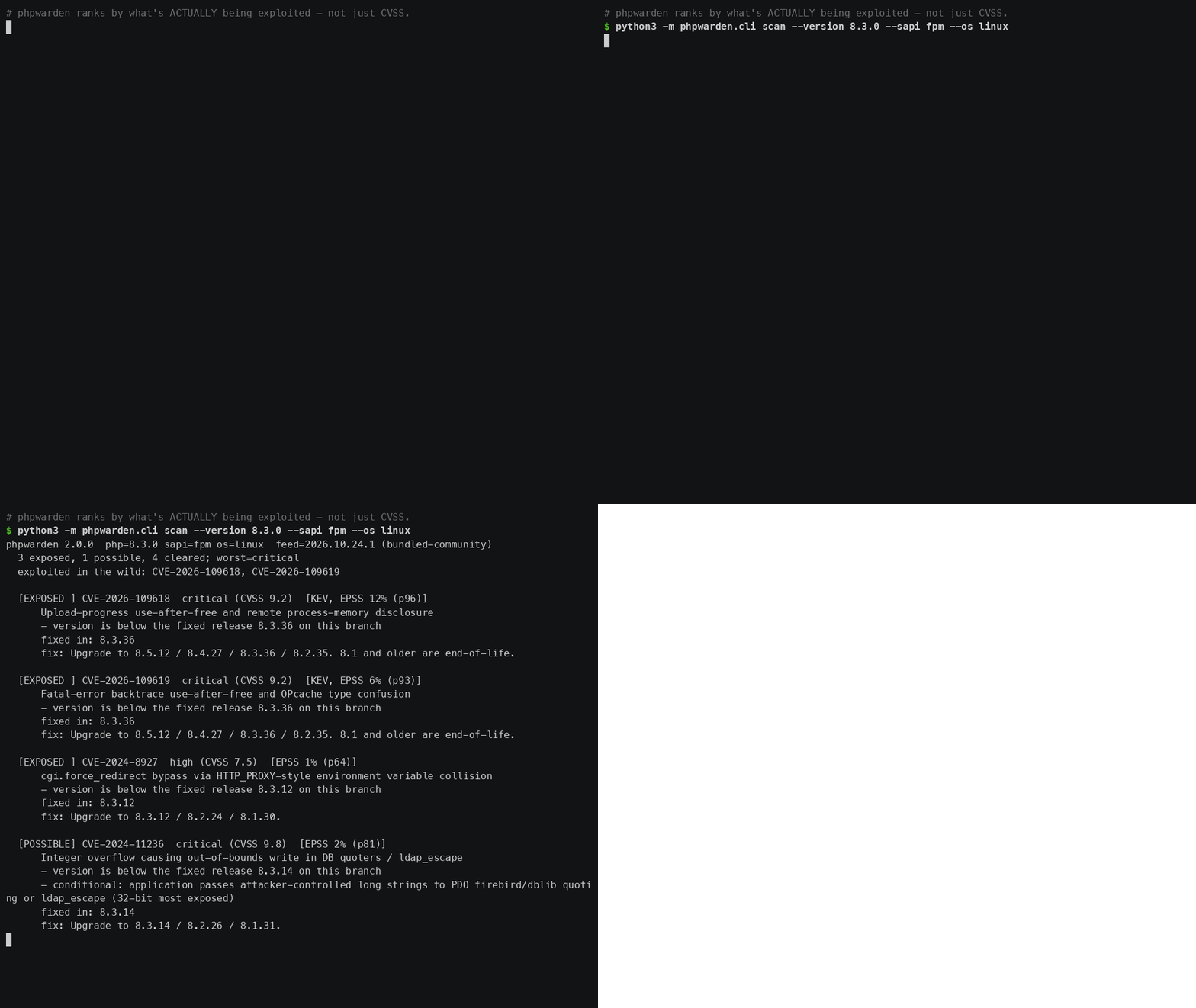
What it does: checks the PHP interpreter on this machine (its version, SAPI and OS) against the engine CVEs in the feed. When to use it: on any server running PHP, in cron, or in CI. With no flags it auto-detects everything; you can also assess a version you don't have installed.
$ phpwarden scan                          # detect local php + SAPI + OS
$ phpwarden scan --version 8.2.20         # assess a version you don't run locally
$ phpwarden scan --sapi fpm --os linux    # override detection
$ phpwarden scan --json # machine-readable output| Flag | Meaning |
|---|---|
--php PHP | Path to the php binary (default php). |
--version V | Assess an explicit version instead of the local one. |
--sapi {fpm,cgi,cli} | Override the detected SAPI (affects exposure scoring). |
--os {linux,windows,darwin} | Override detected OS. |
--json | Emit JSON (feed into report or your own tooling). |
--report-to URL | POST results to a phpwarden ingest URL. |
--report-token TOKEN | Project ingest token (or env PHPWARDEN_REPORT_TOKEN). |
php=8.3.0 sapi=fpm os=linux is what phpwarden
detected, then a tally (3 exposed, 1 possible, 4 cleared) and the in-the-wild list. If you see
php=unknown, it couldn't find PHP — pass --version so verdicts can be definite
instead of [POSSIBLE]. See Key terms for the verdicts.Composer dependencies deps
What it does: reads your composer.lock (the file with exact installed versions) and
checks every package against ~8,600 Composer advisories. When to use it: anywhere your app's
PHP libraries live — locally, in CI on every push, or on the server. It never touches the network or
installs anything; it just reads the lockfile.
$ phpwarden deps composer.lock
$ phpwarden deps composer.lock --json --report-to $URL --report-token $TOKEN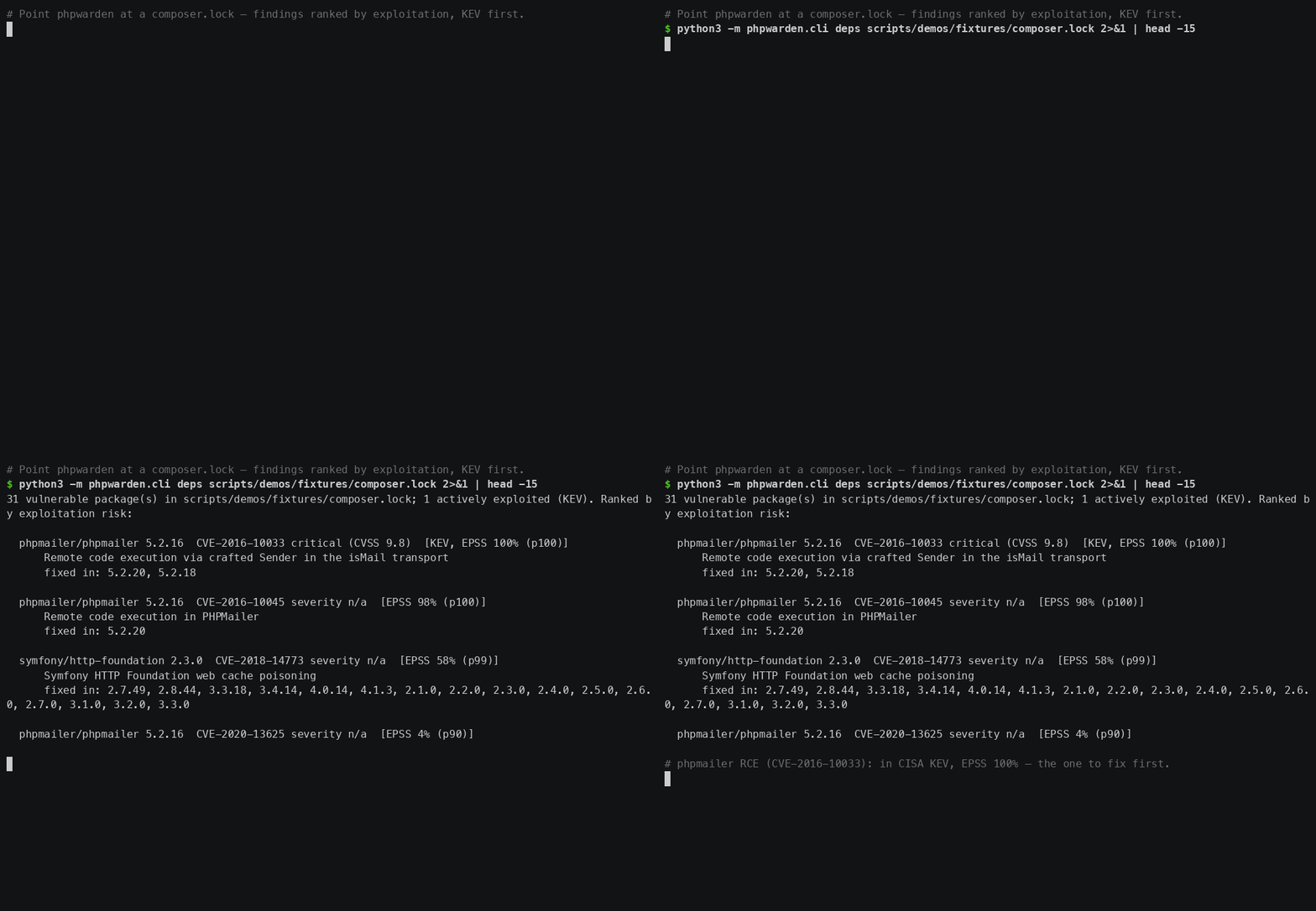
WordPress wordpress
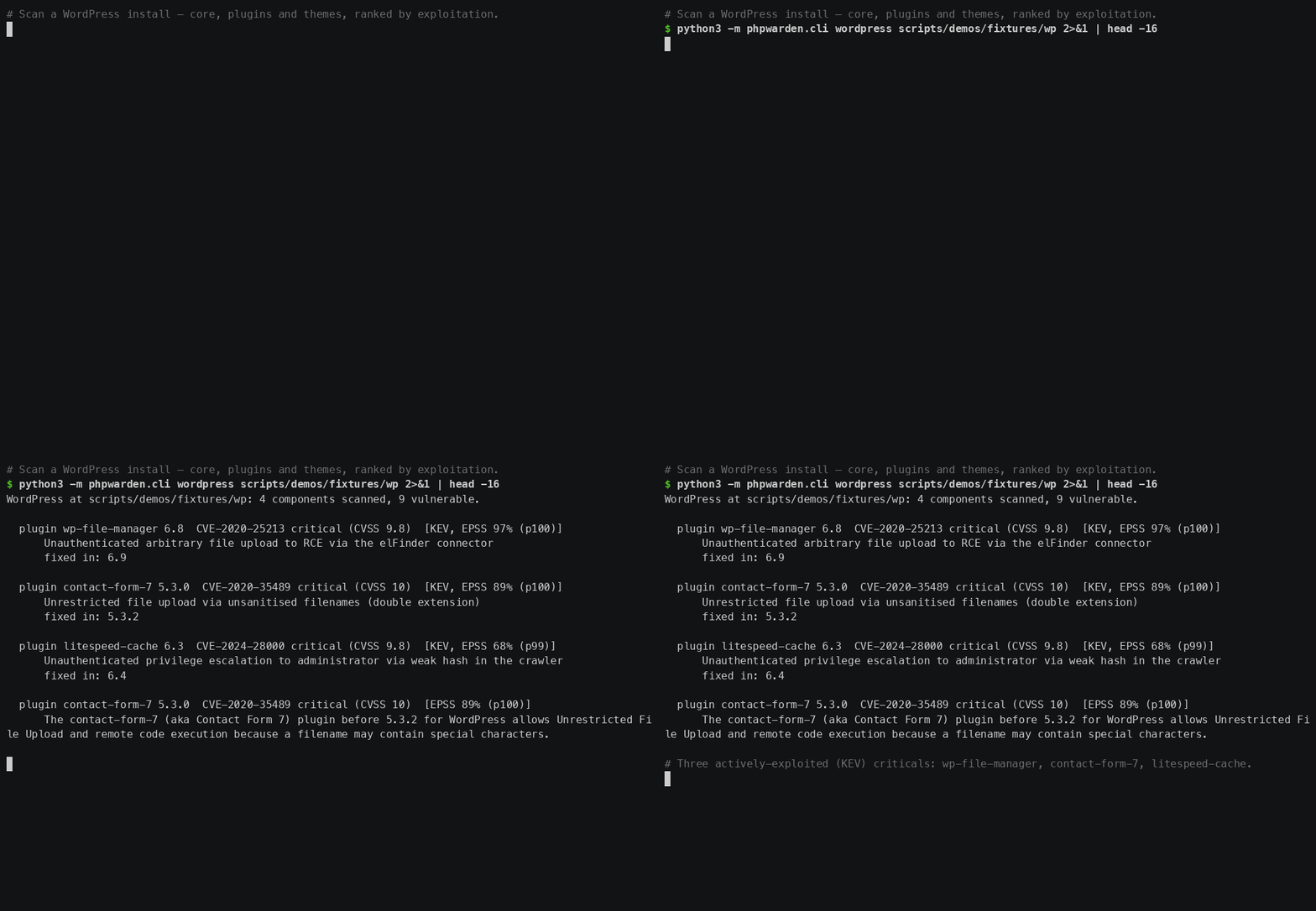
What it does: points at a WordPress install, reads the version of every plugin (from its plugin
header, falling back to readme.txt) and checks them against ~12,300 WordPress plugin
advisories. Core and theme advisories are not in the feed yet. When to use it: on any server hosting
WordPress — plugins are the most-attacked part of the PHP world, so this is often where the KEV findings
are. Give it the folder that contains wp-content/.
$ phpwarden wordpress /var/www/html
$ phpwarden wordpress /var/www/html --host shop-prod --json --report-to $URL --report-token $TOKEN
--host labels the result in a multi-server fleet report.
Log detection detect
What it does: reads a web-server access log and flags requests that match known
exploitation signatures — for example the php-cgi argument-injection probes (CVE-2024-4577) and
PATH_INFO injection (CVE-2019-11043). Matching is done on the request target, decoded, so ordinary
UTF-8 URLs and search queries don't trip it, and raw-byte variants that nginx logs as \xAD
are caught. When to use it: after a scare, during incident response, or on a schedule — the other
commands tell you what's vulnerable; this tells you whether someone has been trying.
Stateful attacks such as php2shell worker-poisoning don't leave a request signature; the
runtime guard detects and contains those live.
$ phpwarden detect /var/log/nginx/access.log
$ phpwarden detect /var/log/apache2/access.log --json
WAF rules rules
Generate PHP-specific blocking rules from the feed's signatures.
$ phpwarden rules --format modsecurity --out php.conf
$ phpwarden rules --format nginx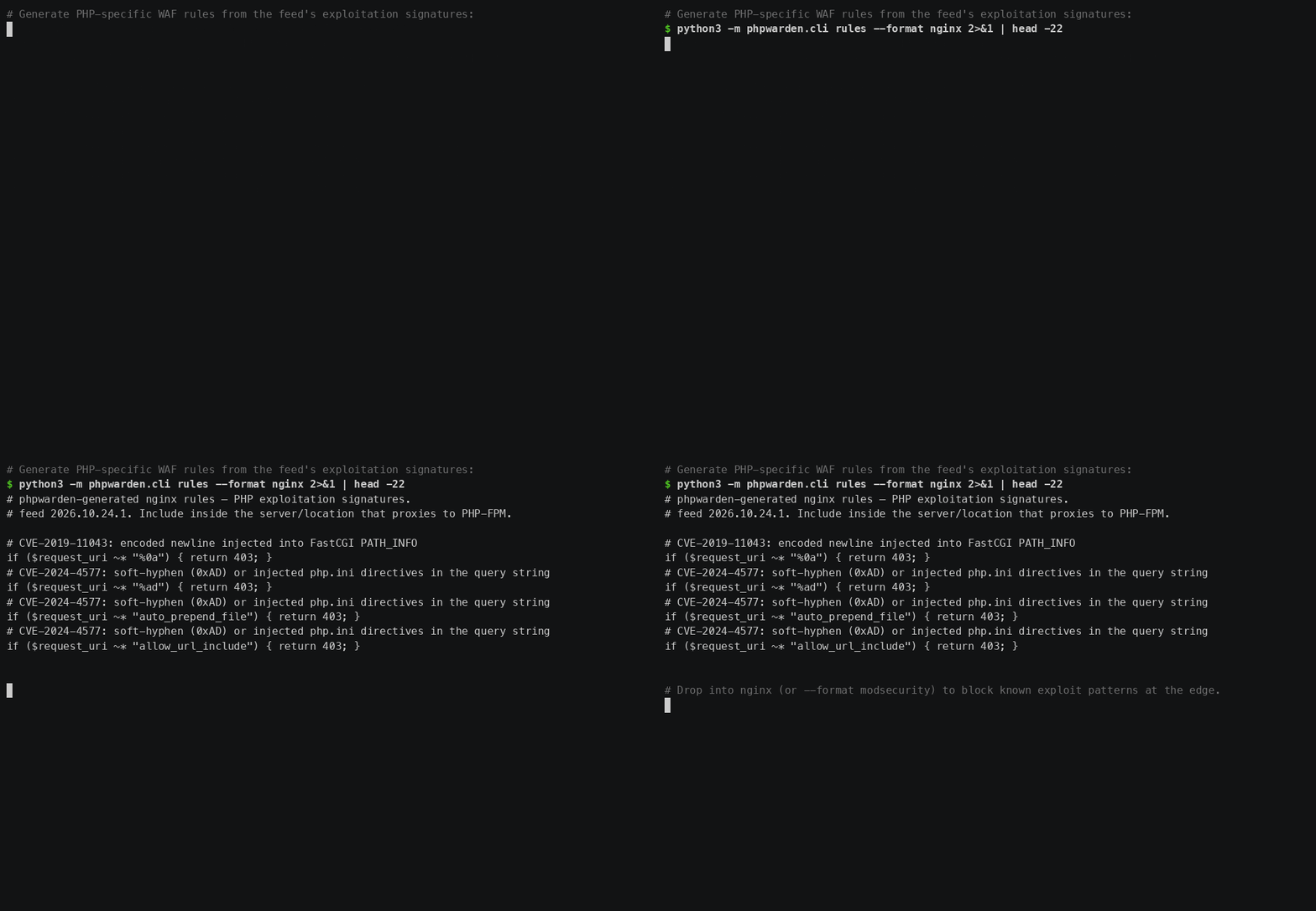
Fleet report report
What it does: takes the --json output of several scans (from many hosts) and merges
them into one self-contained HTML page you can open in a browser or email around. When to use it:
a quick, offline alternative to the hosted dashboard when you just want a shareable snapshot and don't
want to run a server.
$ phpwarden scan --json      > web1.json
$ phpwarden deps composer.lock --json > web1-deps.json
$ phpwarden report web1.json web1-deps.json --out fleet.html
Findings & ranking
phpwarden ranks exploitation-first. Something being attacked in the wild outranks a higher-CVSS vuln nobody is using. The sort order is:
- In the wild — listed in the CISA KEV catalog (known exploited).
- EPSS — FIRST's probability the CVE is exploited in the next 30 days.
- Severity then CVSS as tie-breakers.
| Marker | Meaning |
|---|---|
[EXPOSED] | A feed advisory applies to this host/version/SAPI. Act on it. |
[OK] | No applicable advisory — you're on a fixed branch. |
KEV | Actively exploited (CISA Known Exploited Vulnerabilities). |
EPSS n% | Exploit-likelihood score; higher = more urgent. |
fix: x.y.z | The first fixed version on your release branch. |
The feed
The vulnerability feed is bundled with the package and works fully offline. The free community channel is built from open data; the maintained channel adds continuous updates.
$ phpwarden feed status
feed 2026.10.26.2 (community+osv+foph+nvd): 8 engine CVEs, 8582 Composer, 12328 WordPress (20918 total)
  source=bundled-community, license_key_set=False license_valid=unknown

$ phpwarden feed update        # pull the maintained channel (needs a license)
Sources: OSV.dev (Packagist), FriendsOfPHP/security-advisories, NVD, CISA KEV and FIRST EPSS.
Set PHPWARDEN_LICENSE to switch feed update to the maintained channel.
Connect a project to the dashboard
- Sign up and verify your email, then open the app.
- Create a project — you get a one-time ingest token (
pw_live_…). Copy it; it's shown once. - Run any scan with
--report-toand--report-token(or setPHPWARDEN_REPORT_TOKEN).
$ export PHPWARDEN_REPORT_TOKEN=pw_live_xxxxxxxx
$ phpwarden scan --report-to https://app.phpwarden.io/v1/reports
$ phpwarden deps composer.lock --report-to https://app.phpwarden.io/v1/reports
Results appear on the project dashboard, ranked by exploitation, with history, trends and alerts.
CI integration (GitHub Actions, GitLab, Bitbucket, pre-commit)
The phpwarden action installs the CLI,
scans on every push, and fails the build on what matters. Findings show up three ways without opening a
log: a job summary table with fix versions, pull-request annotations on the exact line of
composer.lock, and optionally SARIF in the GitHub Security tab.
name: phpwarden
on: [push, pull_request]
jobs:
  security:
    runs-on: ubuntu-latest
    steps:
      - uses: actions/checkout@v4
      - uses: oroma-alfred/phpwarden-action@v1
        with:
          fail-on: exploited           # or critical | high | medium | exposed | never
          report-url: https://app.phpwarden.io/v1/reports
report-token: ${{ secrets.PHPWARDEN_TOKEN }}| Input | Default | Meaning |
|---|---|---|
composer-lock | composer.lock | Lockfile to scan (empty to skip). |
wordpress-path | "" | WordPress root to scan (empty to skip). |
php-version | "" | Assess your production PHP version (e.g. 8.3.10) against engine CVEs; with sapi and os. |
fail-on | exposed | exposed (any finding), exploited (CISA KEV only), critical, high, medium, never. Severity thresholds still fail on anything in KEV. |
upload-sarif | false | Send findings to code scanning (needs security-events: write). |
reachability | true | Check whether vulnerable packages are referenced in your code. |
report-url | "" | Ingest URL (empty = local scan only). |
report-token | "" | Project token — store as a repo secret. |
Outputs findings, exploited, worst-severity, sarif-file and
failed are available to later steps. Full reference in the
action README.
Pre-commit hook
Catch a vulnerable composer.lock before it is even committed. The phpwarden repo ships a
pre-commit hook definition; it runs only when composer.lock is
staged and blocks the commit on any known-vulnerable package (exit 1). Add to .pre-commit-config.yaml:
repos:
  - repo: https://github.com/oroma-alfred/phpwarden
    rev: main             # pin to a tag with `pre-commit autoupdate`
    hooks:
      - id: phpwarden-deps
        # args: ["--no-reachability"]   # faster: skip the "is it referenced in code?" pass
Then pre-commit install once per clone. pre-commit builds phpwarden into its own isolated
Python environment, so nothing else on the machine changes.
GitLab CI
A ready-made job lives at
integrations/gitlab-ci/phpwarden.gitlab-ci.yml.
It keeps a JSON copy of the findings as an artifact and fails the pipeline only on a real verdict
(exit 1 vulnerable, 2 possibly exposed). Include it, or paste the job:
phpwarden:
  stage: test
  image: python:3.12-slim
  before_script:
    - pip install --quiet "phpwarden>=2,<3"
  script:
    - phpwarden deps composer.lock --json > phpwarden.json || true
    - phpwarden deps composer.lock          # exit code decides the job
    # add --report-to $PHPWARDEN_REPORT_TO with a masked PHPWARDEN_REPORT_TOKEN variable
  allow_failure: false
  artifacts:
    when: always
    paths: [phpwarden.json]
Bitbucket Pipelines
Same shape for Bitbucket; the full file with a reusable step anchor is at integrations/bitbucket/bitbucket-pipelines.yml.
image: python:3.12-slim
pipelines:
  default:
    - step:
        name: phpwarden
        caches: [pip]
        script:
          - pip install --quiet "phpwarden>=2,<3"
          - phpwarden deps composer.lock --json > phpwarden.json || true
          - phpwarden deps composer.lock    # exit 1 / 2 fail the step
        artifacts:
          - phpwarden.json
Any other CI runner works the same way: pip install "phpwarden>=2,<3", run
phpwarden deps composer.lock, and let the exit code gate the build.
Laravel 10, 11, 12 and 13 projects can also composer require --dev phpwarden/laravel and run
php artisan phpwarden:scan (same exit codes, plus --fail-on=exploited); see the
phpwarden/laravel package.
Ingest API
All machine endpoints authenticate with the project ingest token as a Bearer credential, speak JSON,
and are served under the app origin (e.g. https://app.phpwarden.io).
| Endpoint | Auth | Purpose |
|---|---|---|
POST /v1/reports | Bearer token | Submit scan/deps/wordpress JSON. |
GET /v1/findings | Bearer token | Current findings for the project. |
GET /v1/history | Bearer token | Per-report totals over time. |
Authenticate every request with the header:
Authorization: Bearer pw_live_xxxxxxxxPOST /v1/reports
Body is the raw JSON from any phpwarden … --json command (scan, deps or wordpress). On success
it stores the report and returns a summary. New actively-exploited (KEV) findings trigger an alert to the project owner.
# submit a scan result
$ phpwarden scan --json \
  | curl -s -X POST https://app.phpwarden.io/v1/reports \
      -H "Authorization: Bearer $PHPWARDEN_REPORT_TOKEN" \
      -H "Content-Type: application/json" --data-binary @-
Response 200
| Field | Type | Meaning |
|---|---|---|
ok | bool | Always true on success. |
report_id | string | ID of the stored report. |
source | string | Detected report type: engine, composer or wordpress. |
stored | int | Number of findings persisted. |
new_kev | array | Newly-seen actively-exploited identifiers (empty if none). Drives alerts. |
{"ok": true, "report_id": "r_8f2a…", "source": "engine", "stored": 1, "new_kev": ["CVE-2026-109618"]}GET /v1/findings
Returns the current (latest-per-source) findings, pre-sorted exploitation-first.
$ curl -s https://app.phpwarden.io/v1/findings \
      -H "Authorization: Bearer $PHPWARDEN_REPORT_TOKEN"
Response 200 — {"findings": [ … ]}, each finding:
| Field | Type | Meaning |
|---|---|---|
source | string | engine / composer / wordpress. |
ident | string | CVE or advisory identifier. |
severity | string | critical / high / medium / low / unknown. |
cvss | number | CVSS base score (0 if unknown). |
epss | number|null | FIRST EPSS probability (0–1), or null. |
wild | bool | In the CISA KEV catalog (actively exploited). |
status | string | exposed or ok for this project. |
title | string | Human-readable summary. |
fixed | string | First fixed version on the release branch. |
GET /v1/history
Per-report totals over time (oldest first), for trend charts.
Response 200 — {"history": [ … ]}, each point:
| Field | Type | Meaning |
|---|---|---|
ts | int | Unix timestamp of the report. |
source | string | Report type. |
count | int | Total findings in that report. |
kev | int | How many were actively exploited. |
Errors
Errors return the HTTP status plus a JSON body {"error": "<code>"}.
| Status | Code | When |
|---|---|---|
| 401 | invalid_token | Missing or unknown Bearer token. |
| 400 | bad_json | Body is not valid JSON. |
| 402 | no_credits | Out of API calls. Each API call (report, findings, history) spends one credit; top up in the API tab, or subscribe to Pro for unlimited. |
| 413 | too_large | Request body exceeds the ingest size limit. |
| 429 | rate_limited | Too many requests — slow down and retry. |
| 404 | not_found | Unknown /v1 path. |
Outbound webhooks
Add a webhook in API → Outbound webhooks and phpwarden will POST a signed JSON
event to your URL whenever a new actively-exploited (CISA KEV) finding appears in any of your
projects — so you can route alerts into Slack, PagerDuty, a SIEM, or your own automation.
Payload
{
  "type": "finding.kev",
  "ts": 1792850000,
  "project": { "id": "a1b2c3", "name": "Acme production" },
  "source": "engine",
  "idents": ["CVE-2026-109618", "CVE-2026-109619"],
  "message": "Newly actively-exploited (CISA KEV) in 'Acme production' (engine): …"
}
A "type": "ping" event is sent when you click Send test.
Verifying the signature
Every delivery carries an X-Phpwarden-Signature: t=<ts>,v1=<hmac> header. The
v1 value is HMAC-SHA256 of "<ts>.<raw-body>" keyed with your
webhook's signing secret (shown once when you create it). Reject anything that doesn't match, or whose
ts is stale.
# Python receiver
import hashlib, hmac, time
def verify(raw_body, header, secret):
    parts = dict(p.split("=",1) for p in header.split(","))
    signed = f"{parts['t']}.".encode() + raw_body
    expected = hmac.new(secret.encode(), signed, hashlib.sha256).hexdigest()
return hmac.compare_digest(expected, parts["v1"]) and abs(time.time()-int(parts["t"])) < 3002xx quickly and do slow work asynchronously.Runtime guard
A daemon (shipped in the package) that watches PHP-FPM for worker-poisoning (php2shell-class) attacks and
recycles a corrupted worker before it serves a second request — containment the scanners don't do. It
reads each pool's access + error logs, correlates a fatal/OOM on a worker PID with that same PID then
serving 5xx, and SIGTERMs it so the FPM master respawns a clean worker.
$ phpwarden-guard --config guard.config.json                 # dry-run by default
$ phpwarden-guard --config guard.config.json --mode ENFORCE --allow-enforce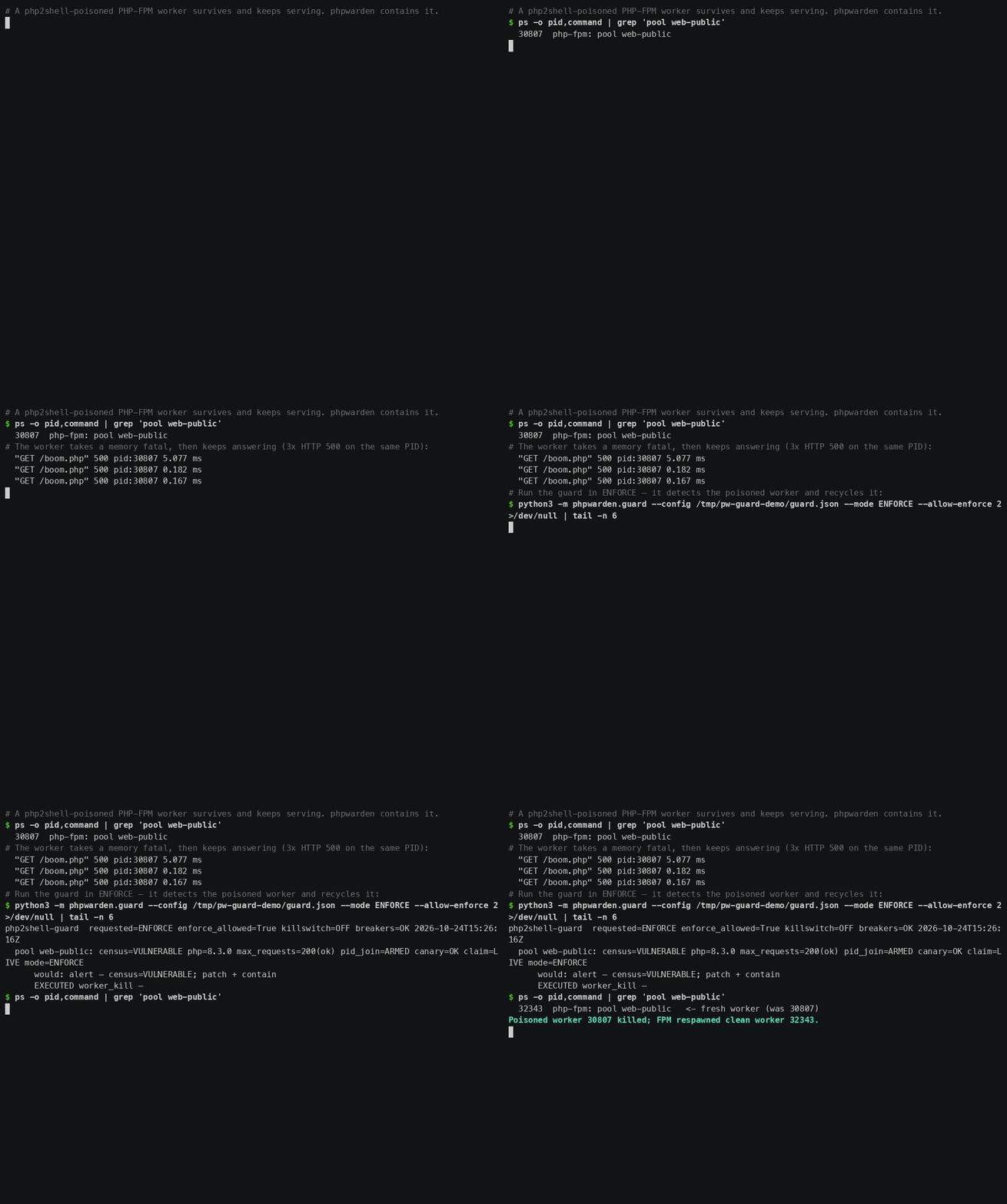
Troubleshooting & FAQ
zsh: command not found: $
You copied the example with the leading $ prompt. The $ isn't part of the
command — it just marks "type this in a shell." Run everything after it. (The Copy button on code
blocks here strips the $ for you.)
pip: command not found or error: externally-managed-environment
phpwarden is on PyPI;
these are your Python setup, not the package. On macOS pip is pip3, and a
system-wide install is blocked by PEP 668.
The fix is pipx install phpwarden (brew install pipx first on macOS), or a venv:
python3 -m venv v && v/bin/pip install phpwarden. No-install option: the single-file
python3 phpwarden.pyz scan. See Install.
It says php=unknown and everything is [POSSIBLE]
phpwarden couldn't find or run a php binary, so it can't confirm your version and won't claim
a definite verdict. Either install PHP, point at it with --php /path/to/php, or tell it the
version directly: phpwarden scan --version 8.3.12. With a known version the same findings
become a definite [EXPOSED] or [CLEARED].
The scan found nothing — is it working?
Very likely yes, and you're patched. 0 exposed with findings cleared is the goal.
To prove it's really checking, scan a deliberately-old version: phpwarden scan --version 8.3.0
should light up with the php2shell CVEs.
Can I run it with no internet / air-gapped?
Yes — that's a core design point. Every scan uses the feed bundled in the download; nothing is sent
anywhere. Only two things need the network, and both are optional: --report-to (push results
to a dashboard) and phpwarden feed update (pull the maintained feed, Pro). See
The feed.
Windows-only CVEs are showing on my Linux box (or vice-versa)
Detection uses the OS it auto-detected. If you're assessing a version for a different target, set it:
--os linux (or windows/darwin) and --sapi fpm. OS/SAPI-gated
advisories are then correctly cleared or kept.
The API returns 401 invalid_token
The Bearer token is missing, mistyped, or was rotated. Tokens are shown once at project creation; if you
lost it, rotate it in Settings and update --report-token / PHPWARDEN_REPORT_TOKEN.
See Ingest API.
Which command should I run?
Running PHP on a server → scan. Have a composer.lock →
deps. Running WordPress → wordpress. Want it to block CI on a
finding → add any of them to CI. Want live attack containment →
runtime guard. You can run several and send them all to one dashboard.
Still stuck? Start free and open a project, or see the comparison on the home page.